
Rectangle
By default, a Rectangle is just an empty item that shows nothing. By setting a color or configuring a border,
it’s then possible to draw a rectangle on the screen.
When not part of a layout, its width and height default to 100% of the parent element.
export component ExampleRectangle inherits Window {    width: 200px; height: 800px; background: transparent;
    Rectangle {        x: 10px; y: 10px;        width: 180px;        height: 180px;        background: #315afd;    }
    // Rectangle with a border    Rectangle {        x: 10px; y: 210px;        width: 180px;        height: 180px;        background: green;        border-width: 2px;        border-color: red;    }
    // Transparent Rectangle with a border and a radius    Rectangle {        x: 10px; y: 410px;        width: 180px;        height: 180px;        border-width: 4px;        border-color: black;        border-radius: 30px;    }
    // A radius of width/2 makes it a circle    Rectangle {        x: 10px; y: 610px;        width: 180px;        height: 180px;        background: yellow;        border-width: 2px;        border-color: blue;        border-radius: self.width/2;    }}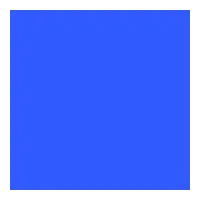
Properties
Section titled “Properties”background
Section titled “background”brushdefault: transparent
The background brush of this Rectangle, filling its geometry.
Without a background and without a border, the Rectangle paints nothing.
A translucent background lets the content underneath show through.
property <brush> rainbow-gradient: @linear-gradient(40deg, rgba(255, 0, 0, 1) 0%, rgba(255, 154, 0, 1) 10%, rgba(208, 222, 33, 1) 20%,rgba(79, 220, 74, 1) 30%, rgba(63, 218, 216, 1) 40%, rgba(47, 201, 226, 1) 50%, rgba(28, 127, 238, 1) 60%, rgba(95, 21, 242, 1) 70%, rgba(186, 12, 248, 1) 80%, rgba(251, 7, 217, 1) 90%, rgba(255, 0, 0, 1) 100%);
Rectangle {    x: 10px;    y: 10px;    width: 180px;    height: 180px;    background: #315afd;}

Rectangle {    x: 10px;    y: 210px;    width: 180px;    height: 180px;    background: rainbow-gradient;}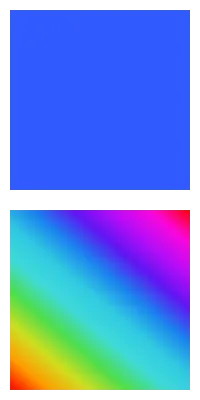
border-color
Section titled “border-color”brushdefault: transparent
Rectangle { width: 200px; height: 200px; border-width: 10px; border-color: lightslategray;}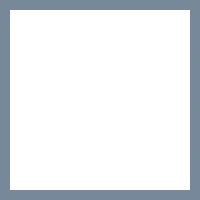
The color of the border.
border-width
Section titled “border-width”lengthdefault: 0
Rectangle { width: 200px; height: 200px; border-width: 30px; border-color: lightslategray;}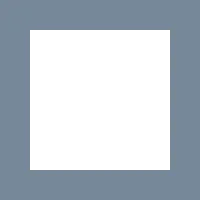
The width of the border.
booldefault: false
// clip: false; the defaultRectangle {    x: 50px; y: 50px;    width: 150px;    height: 150px;    background: darkslategray;    Rectangle {        x: -40px; y: -40px;        width: 100px;        height: 100px;        background: lightslategray;    }}
// clip: true; Clips the children of this RectangleRectangle {    x: 50px; y: 250px;    width: 150px;    height: 150px;    background: darkslategray;    clip: true;    Rectangle {        x: -40px; y: -40px;        width: 100px;        height: 100px;        background: lightslategray;    }}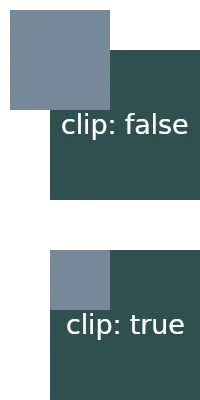
By default, when child elements are outside the bounds of a parent,
they are still shown. When this property is set to true, the children
of this Rectangle are clipped and only the contents inside the elements bounds are shown.
Border Radius Properties
Section titled “Border Radius Properties”border-radius
Section titled “border-radius”lengthdefault: 0
The size of the radius. This single value is applied to all four corners.
To target specific corners with different values use the following properties:
border-top-left-radius
Section titled “border-top-left-radius”lengthdefault: 0px
border-top-right-radius
Section titled “border-top-right-radius”lengthdefault: 0px
border-bottom-left-radius
Section titled “border-bottom-left-radius”lengthdefault: 0px
border-bottom-right-radius
Section titled “border-bottom-right-radius”lengthdefault: 0px
Drop Shadows
Section titled “Drop Shadows”Use the drop-shadow-* properties to draw a shadow of a rectangle’s painted shape.
The fill and border alpha determine the shadow’s shape and strength.
These semantics correspond to CSS filter: drop-shadow(), with an additional spread property.
A rectangle with a transparent fill and an opaque border casts a border-shaped shadow.
The offset shadow can remain visible through transparent parts of the rectangle.
Children don’t contribute to the shadow; a rectangle without a background or border casts no shadow.
The Vello GPU renderer blurs shadows of opaque backgrounds only.
Shadows of translucent or border-only rectangles render without blur on that renderer.
drop-shadow-blur
Section titled “drop-shadow-blur”lengthdefault: 0px
The radius of the shadow that also describes the level of blur applied to the shadow. Negative values are ignored and zero means no blur.
drop-shadow-color
Section titled “drop-shadow-color”colordefault: a transparent color
The base color of the shadow to use. Typically that color is the starting color of a gradient that fades into transparency.
drop-shadow-offset-x
Section titled “drop-shadow-offset-x”lengthdefault: 0px
The horizontal distance of the shadow from the element’s frame.
drop-shadow-offset-y
Section titled “drop-shadow-offset-y”lengthdefault: 0px
The vertical distance of the shadow from the element’s frame.
drop-shadow-spread
Section titled “drop-shadow-spread”lengthdefault: 0px
Grows (positive) or shrinks (negative) the shadow shape on all sides before the blur is applied. Positive spread also thickens borders inward; negative spread thins them. Supported by the Skia, FemtoVG, and Vello renderers. The Qt backend ignores spread.
Inner Shadows
Section titled “Inner Shadows”Inner shadows are rendered inside the element’s geometry (inverted from drop shadows), giving the appearance of an inwards-cast shadow. They follow the same parameters as drop shadows. Currently only supported by the Skia renderer.
The CSS equivalent is box-shadow with the inset keyword: box-shadow: inset 2px 2px 4px 1px black
translates to inner-shadow-offset-x: 2px; inner-shadow-offset-y: 2px; inner-shadow-blur: 4px; inner-shadow-spread: 1px; inner-shadow-color: black;.
inner-shadow-blur
Section titled “inner-shadow-blur”lengthdefault: 0px
The blur radius of the inner shadow.
inner-shadow-color
Section titled “inner-shadow-color”colordefault: a transparent color
The base color of the inner shadow.
inner-shadow-offset-x
Section titled “inner-shadow-offset-x”lengthdefault: 0px
Horizontal offset of the inner shadow inside the element.
inner-shadow-offset-y
Section titled “inner-shadow-offset-y”lengthdefault: 0px
Vertical offset of the inner shadow inside the element.
inner-shadow-spread
Section titled “inner-shadow-spread”lengthdefault: 0px
Positive spread thickens the shadow band along the element’s interior boundary; negative spread thins it.
© 2026 SixtyFPS GmbH